

Get smart notifications delivered via email to help you increase form engagement and participation.
- Engagement monitoring: Forms sends you drafts to notify unresponsive participants, encouraging them to complete forms or quizzes.
- Insights reminder: When you have sufficient responses, Forms prompts you to check form insights for informed decision-making.
- Tailored messages: Smart notification analyze form goals, status, gaps, and deadlines and sends personalized messages based on participant behavior.
- Feedback and incentives: Smart notification encourages participants to complete the form and suggests follow-up actions for form authors.
Try it
Open Microsoft Forms and create a form or quiz as you normally would.
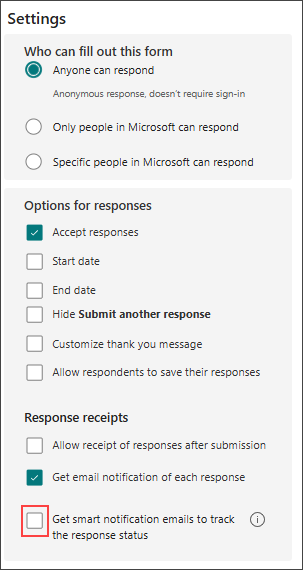
Configure your form settings by selecting the following options:
Anyone can respond: allows anyone with the link to fill out the form.
Accept responses: enables form submission.
Get email notification of each response: sends you an email when someone submits the form.
Get smart notification emails to track the response status: enables smart reminders.
Invite respondents by using the Collect Responses feature.
Smart Notifications: When someone receives an email invitation but doesn't submit the form, the form owner will receive a response status email after about 16 hours.
Select the Send Reminder button in the email to send a reminder to the non-respondent, encouraging them to fill out the form.