
When you refresh or reimport XML data, you can choose whether Excel replaces existing mapped data or appends new data to XML tables.
If the Developer tab isn't visible, show the Developer tab.
Select a mapped cell to choose the XML map you want to configure.
On the Developer tab, in the XML group, select Map Properties.
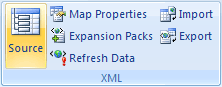
In the XML Map Properties dialog box, select one of the following options:
- Overwrite existing data with new data: When you refresh or reimport XML data, Excel replaces existing data in both single-mapped cells and XML tables with the new data.
- Append new data to existing XML tables: When you refresh or reimport XML data, Excel adds the new data to the end of the existing XML table. Single-mapped cells remain unchanged; new data is neither appended to them nor used to overwrite their existing data.
Need more help?
You can always ask an expert in the Excel Tech Community or get support in Communities.