
A timeline can really help you out when you need to report “big picture” project information. It’s a professional-looking snapshot of key tasks and milestones that’s good to go in any status meeting — just drop it into a PowerPoint slide or Word doc, or email it to your boss.
Click anywhere in the timeline.
Select Format > Copy Timeline, and pick a size:
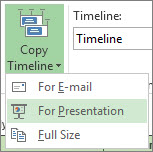
- For E-mail: Small. Fits easily in an Outlook email message.
- For Presentation: Medium. Designed to work in a PowerPoint slide.
- Full Size: Large. The same size it appears in Project.
Paste the timeline into any program that displays graphics.