Surface Laptop Studio 2 is a powerful laptop and portable studio in one. It adapts to you and all the different things you do during the day—whether for work, school, or play.
Get to know Surface Laptop Studio 2
Here's some of the top features and details that can help you get familiar with Surface Laptop Studio 2:
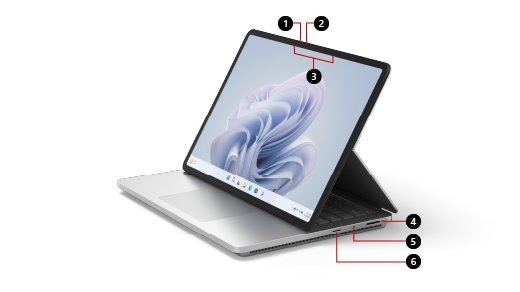
- Windows Hello camera
- Front-facing camera
- Studio Mics
- Surface Connect port
- Headphones jack
- MicroSDXC card reader
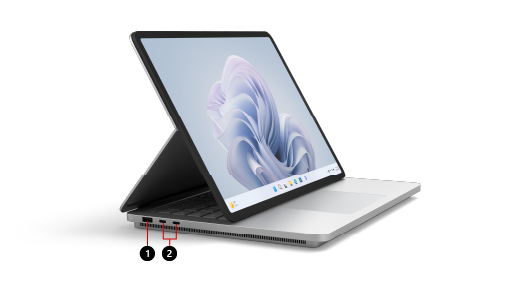
- USB-A port
- Two USB-C ports with USB 4.0/Thunderbolt™ 4
Surface Laptop Studio 2 and Windows 11
Surface Laptop Studio 2 comes with:
- Windows 11 Home edition (for consumer customers)
- Windows 10/11 Pro edition (for business customers)
If you have Windows 11 Home on your device, you can upgrade to Windows 11 Pro for an additional cost. For more info, see Upgrade Windows Home to Windows Pro .
To find out which version of Windows you have, see Which Windows operating system am I running?
Charging your Surface
You can charge your Surface using USB-C or Surface Connect. For more information, see How to charge Surface.
Features
Here are some of the features that make Surface Laptop Studio 2 so adaptable.
Adjustable screen angle
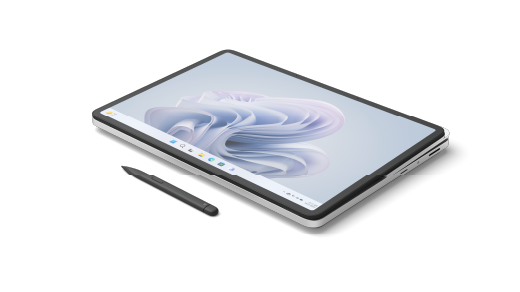
Surface Laptop Studio 2 transforms from a laptop to an angled stage to a portable canvas, so you can get things done throughout your day. Start by using it like a laptop. Then you can pull the screen forward so it’s angled in stage mode when you’re ready to collaborate with colleagues, watch a show online or play Xbox games online. When inspiration strikes, pull the screen forward all the way down, so it's the perfect height to use as a portable studio to write, draw, or just doodle with Surface Slim Pen 2 (sold separately). For more info, see Different ways to use Surface Laptop Studio .
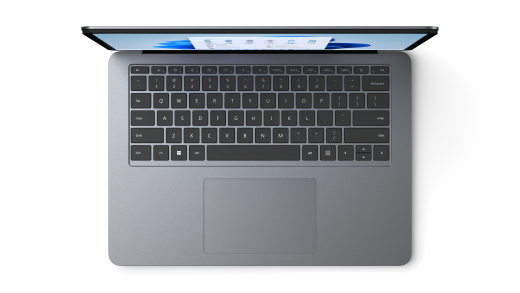
Large Precision Haptic touchpad
Surface Laptop Studio 2 has a large haptic touchpad that gives you realistic feedback when you tap it—you'll hear it click when you're using it. With its large size, you have more room to work. And because it runs on Windows 11, you can customize the touchpad gestures. For more info, see Surface touchpad use and settings .
Wake on Touch
When your Surface Laptop Studio 2 goes to sleep, you can quickly wake it—just tap the screen when you're in stage or studio mode to get back to what you were doing.
Surface Slim Pen 2 compatibility
Surface Slim Pen 2 (sold separately) is made for Surface Laptop Studio 2. Just fold the screen down to use it in studio mode for a great, realistic writing and drawing experience. When drawing on the vibrant PixelSense™ Flow 14.4" touch display that has a refresh rate up to 120Hz, you'll feel like you're drawing on paper. Whether you're drawing a masterpiece or just sketching things out, Surface Laptop Studio 2 and Surface Slim Pen 2 will help you get it done when you want.
When you're finished, just put Surface Slim Pen 2 under the front of the keyboard of Surface Laptop Studio 2—it attaches magnetically to securely store it and charge. For more info about Surface Slim Pen 2, see Use Surface Slim Pen 2.
Get the most out of your Surface
Learn more about your Surface and customize it with the Surface app. To open it, select Start
 , enter Surface, and select it to open the app. If the app doesn't open, get it from the Microsoft Store.
A more repairable device design
Many components can be replaced by authorized service providers or skilled technicians — supporting a more repairable device design. Replacement components, such as laptop feet, are available for out-of-warranty repair. Availability and service options may vary by product, market, and over time.
To learn more, see Self-repair information for your Surface device.
| Feature | Details |
|---|---|
| Processor | Consumer
|
| Graphics | Graphics options:
|
| Memory and storagei | Memory options:
|
| Display |
|
| Size and Weightxix |
|
| Battery Lifevi |
|
| Security | Consumer
|
| Cameras |
|
| Audio | |
| Ports |
|
| Network and connectivity |
|
| Pen & accessories compatibility |
|
| Software | ConsumerCommercial
|
| Accessibility |
|
| Serviceability | ConsumerCommercial Replaceable components includes:
|
| Exterior |
|
| Hinge | Dynamic Woven Hinge made of woven fabric |
| Sensors |
|
| What’s in the box |
|
| Keyboard layout |
|
| Warranty | 1-year limited hardware warranty |
| Battery Capacities |
|
[i] System software uses significant storage space. Available storage is subject to change based on system software updates and apps usage. 1 GB = 1 billion bytes. 1 TB = 1,000 GB. See Surface.com/Storage for more details.
[ii] Consumer
This device does not contain user serviceable parts. The hard drive is only removable by an authorized technician following Microsoft provided instructions.
Commercial
Customer Replaceable Units (CRUs) are components available for purchase through your Surface Commercial Authorized Device Reseller. Components can be replaced on-site by a skilled technician following Microsoft's Service Guide. Opening and/or repairing your device can present electric shock, fire and personal injury risks and other hazards. Use caution if undertaking do-it-yourself repairs. Device damage caused during repair will not be covered under Microsoft's hardware warranty or protection plans. Availability of replaceable components and service options may vary by market and/or at initial product launch.
[iii] Surface Laptop Studio 2 display has rounded corners within a standard rectangle. When measured as a standard rectangular shape, the screen is 14.36" diagonally (the actual viewable area is less).
[iv] Requires Dolby Vision® encoded content and video.
[v] HDR requires HDR content and enabling HDR in device settings.
[vi] Up to 18.0/19.0 hours of battery life based on typical Surface device usage on Surface Laptop Studio 2 with Intel® Core™ i7-13700H Processor, NVIDIA® GeForce™ RTX 4050 Laptop GPU, 512GB, 16GB RAM
Testing conducted by Microsoft in July-August 2023 using preproduction Windows 11 software and preproduction Surface Laptop Studio 2 Intel® Core™ i7-13700H Processor, 512GB, 16GB RAM devices. Testing consisted of full battery discharge with a mixture of active use and modern standby. The active use portion consists of (1) a web browsing test accessing eight popular websites over multiple open tabs, (2) a productivity test utilizing Microsoft Word, PowerPoint, Excel, OneNote and Outlook, and (3) a portion of time with the device in use with idle applications. All settings were default except screen brightness was set to 150 nits with Auto-Brightness, Adaptive Color, and Smart Charging disabled. Wi-Fi was connected to a network. Tested with Windows 11 Version 10.0.22621 (22H2). Battery life varies significantly with settings, usage, and other factors.
[vii] Voice Clarity requires Windows 11 and is available in apps which use integrated device microphones and use certain Windows audio processing modes.
[viii] Requires Dolby® Atmos® encoded content/audio.
[ix] Sold separately
[x] Requires license or subscription (sold separately) to activate and use.
[xi] Activation required. After 30 days, you will be charged the applicable monthly or annual subscription fee. Credit card required. Cancel any time to stop future charges. See Free Trial - Try Microsoft 365 for a month - Microsoft Store.
[xiii] Sold separately. Software license required for some features. Japan versions are pre-installed.
[xiv] Activation required. If your device is managed by your organization's IT department, contact your IT administrator for activation. If you activate your trial outside your organization, after 30 days, you will be charged the applicable monthly or annual subscription fee. Credit card required. Cancel any time to stop future charges. See Learn more about business subscription trials.
Japan versions are pre-installed.
[xviii] Microsoft's Limited Warranty is in addition to your consumer law rights.
[xix] Might vary depending on manufacturing processes.
Related topic
Need more help?
Technical support

For technical support, open the Surface app or web browser, describe your problem and select Get Help.
Community support

Communities can help you ask questions, and hear from experts with rich knowledge. Ask the Community.
Other support

If you can't use your Surface or have a question about something else, open Get Help to get other support online.